
Accounts
Books your auditor can open and trust
Every fee, bill and voucher posts to the school's own double-entry ledger. The trial balance agrees on any day of the year, and the year ends with a finished pack for your chartered accountant.
Set fees once, then collect them in seconds
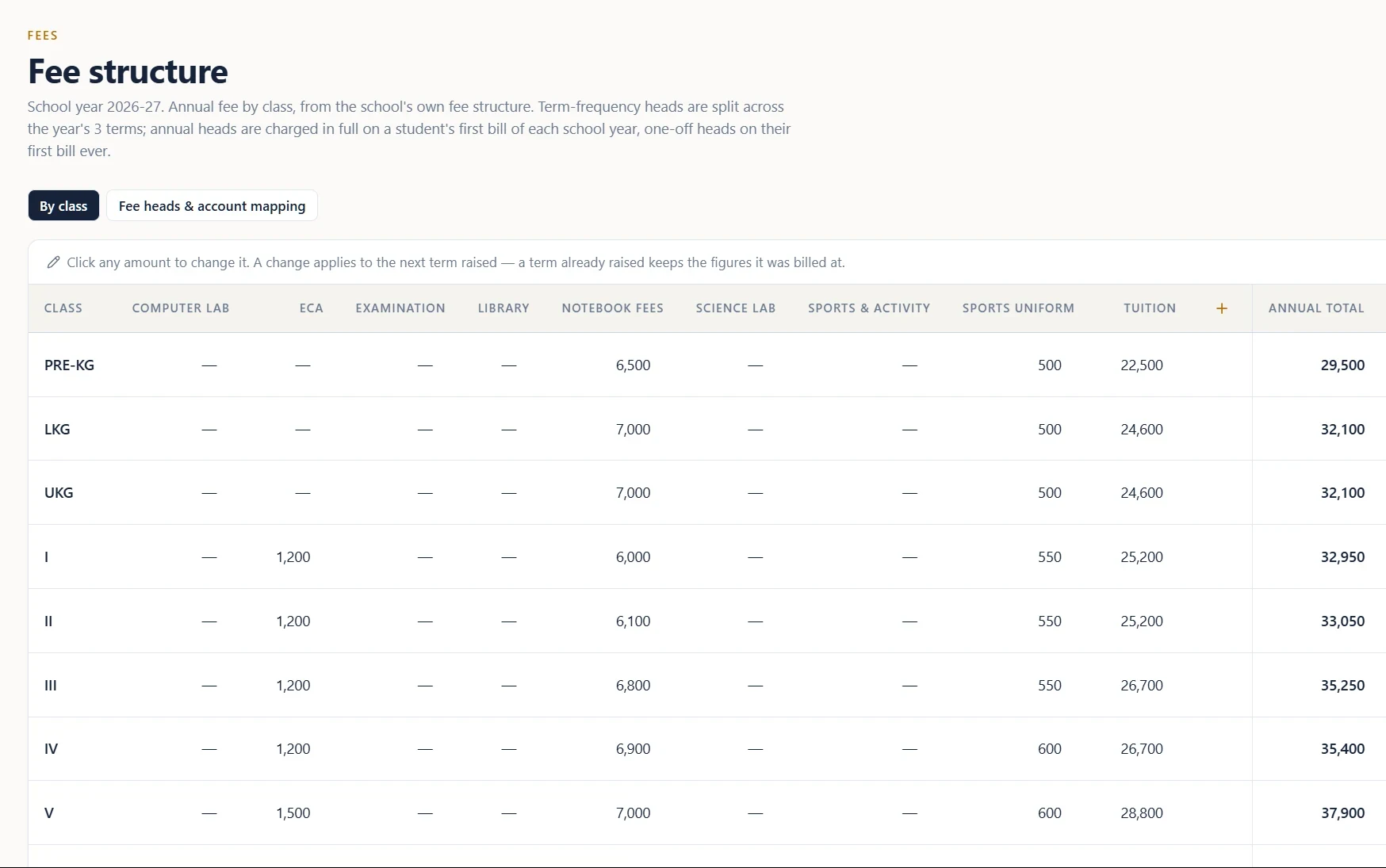
Every class and fee head in one grid. At the counter a receipt prints, and the parent sees it in the Stoodent app.
Fee structure by class. Every head and term in one grid. Change an amount and it applies from the next term.
Term demands in one click. Raise fees for the whole roster at once.
Class-wise dues. See defaulters by term and send reminders.
Concessions with approval. Sibling, staff and scholarship discounts need a sign-off.
Cheque and DD clearing. Track realisation and post bounces back to the ledger.
From fee head to receipt
Set the year's fees once. The counter takes them in seconds, and nobody can quietly change a receipt afterwards.
Fee structure by class
Every head and term in one grid, and a term's bills raised for the whole roll in one step.
Concessions as your rules
A percentage or a fixed amount, for the year or off each bill, granted with an approval.
Late fees, your way
Once, per day or per month, with a grace period and a cap. Only those who give concessions can waive one.
Pay ahead
A parent can pay through a chosen term; the advance settles itself when the next term is billed.
Cheques and split payments
Part cash, part cheque. Realisation tracked, and a bounced cheque posted back to the books.
Receipts that stay put
A posted receipt cannot be edited. Cancelling reverses it, and can be set to need someone's approval.
Bills that need a signature
Approvals by amount
Set who approves what. A bill above someone's limit goes to the next person up.
Nobody approves their own
An entry raised by an approver always goes to someone else.
Vendors and payables
Each vendor's bills, payments, open balance and TDS, in one place.
Petty cash
A controlled float for day-to-day spending, topped up and spent a line at a time.
Every voucher printable
Receipts, payments, journals and contra entries, each with its own printed voucher.
Budgets against actuals
Set the year's budget by head and see where spending stands against it.
Books, not a cash log
Trial balance on any date
Every account's balance, and a plain check that debits and credits agree.
Bank and cash books
A book for every account, with bank reconciliation against the statement.
Drill down to the voucher
From a group total in the balance sheet to the entry behind it in two clicks.
Fixed deposits
The FD register with interest worked out, TDS by bank, maturity, renewal and early closure.
Fixed assets
The asset register and its depreciation, posted to the books.
Exports on every report
Each report to Excel or on paper, as your office prefers.
The year end, finished
One audit pack
Eight reports generated together, with every figure that must agree checked against the others.
Close and lock
Lock a year after sign-off so nothing can be backdated; open the next year early if you need to.
Move-up day
Children moved to their next class in one run, with any money held for a leaver flagged.
An auditor's login
Your chartered accountant reads the books without being able to change them.
An audit log
Who changed what, and when, for every entry.
Roles of your own
Correspondent, principal, accountant and cashier out of the box, and roles of your own.
Some of this comes with the Standard or Pro tier. See what each tier holds.
Questions about Accounts
If your question isn't here, ask us on the phone or WhatsApp.
Can we charge a late fee and still waive it for a family?
Yes. The late fee is the school's own rule: once, per day or per month, with a grace period and a cap. It is collected at the counter as its own bill, and only people who can grant concessions can waive it.
What happens when a parent's cheque bounces?
Record the bounce against the cheque. Stoodent reverses the receipt in the books and the amount is owed again on the child's statement.
Can our chartered accountant log in?
Yes. The auditor role reads every book and report and downloads the audit pack, but cannot post or change anything.
Do you handle the school's fixed deposits?
Yes. Keep each FD with its bank, rate and term; Stoodent works out the interest, records TDS as the bank deducted it, and handles maturity, renewal and early closure. The FD schedule is part of the audit pack.
Can a closed year be changed later?
Not once it is locked. Lock the year after your auditor signs off and nothing can be backdated into it.
See your own fee structure running in Stoodent
See how one set of books would run your school. In a 20-minute demo you'll see:
Rather talk now? Call +91 94870 65364Or message us on WhatsAppTry the live demo Your school's name on a working Stoodent, in a minute.Book a free demo
Takes under a minute.